Board update deck Super Agent
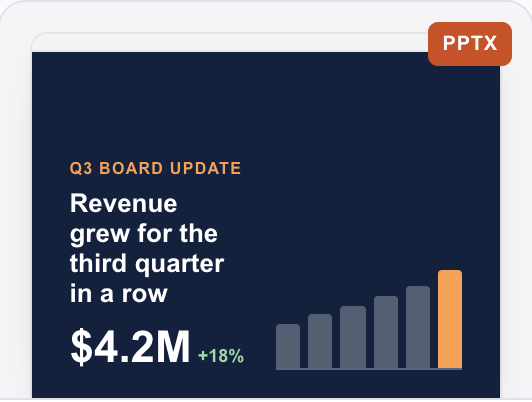
12 slides with charts from last quarter's numbers.
Super AgentGive each AI teammate a role, then @-mention it in a group chat. A cloud agent like Spark can hand parts of a job to other teammates and post finished files in the chat for you to review.
 Find why signups dropped
 Write launch posts
 Make social images
 Fix a checkout bugCompare competitor pricing
 Triage my inboxData Analyst
 Claude
 SparkCoordinatesGraphic Designer
 GeminiSoftware Engineer posted sundial-landing.htmlIllustrativeLaunch crew4 membersIllustrative example
Today
Start with Spark, your own assistant, then hire teammates for the roles your work needs. Each one runs on the model you choose.
SparkYour own assistantCoordinates the teamData AnalystReady-made roleClaudeCopywriterReady-made role GPTGraphic DesignerReady-made roleGeminiSoftware EngineerReady-made roleClaudeEmail AssistantReady-made roleGPT
Models shown are examples. You pick the model for each teammate.
An AI teammate is an AI agent with a role that works in your team's group chats. You @-mention it with a job, it can hand parts of that job to other AI teammates, and cloud agents can post finished files back in the chat where everyone can review them.
Message a cloud agent like Spark with the whole job. It can work on parts in the background, then bring the results and files back to the conversation.
SparkIllustrative exampleToday
Working on the launch materials…
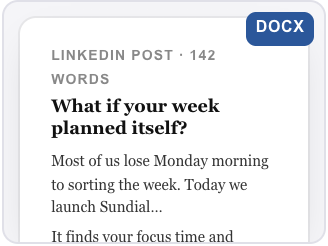
Cloud agents hand back slides, spreadsheets, websites and documents in the chat, ready to review and share.
12 slides with charts from last quarter's numbers.
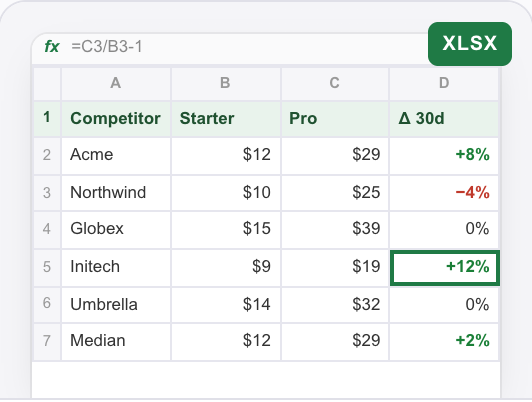
Super AgentFive competitors, plan prices and 30-day change.
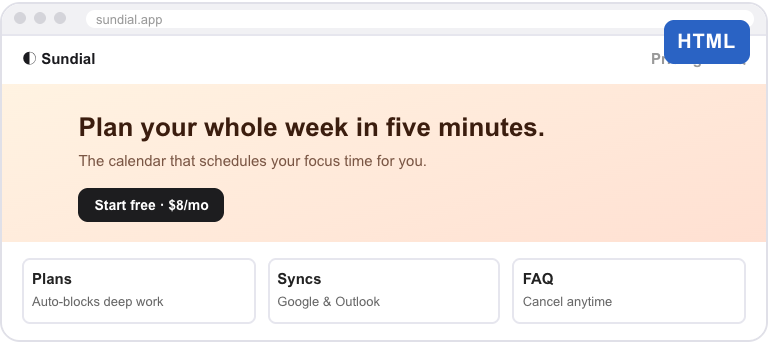
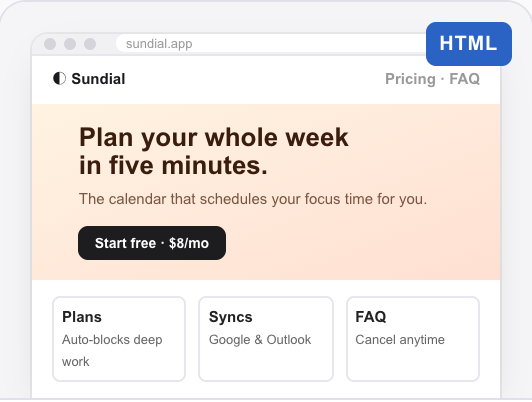
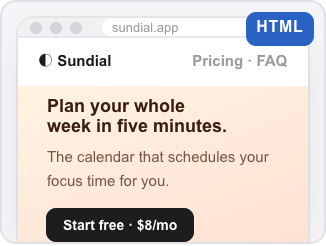
Data AnalystA live page built from the brief, with the price and FAQ.
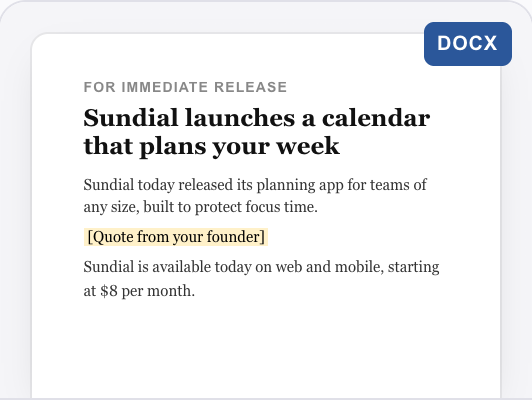
Software EngineerReady to send, with a spot left for your quote.
CopywriterExample outputs for illustration.
A chatbot answers in text. AI teammates split the job, do the parts and hand back files.
You get advice. Building, writing and formatting are still your job.
You get the finished files, ready to review in the chat.
Illustrative example.
Pick from dozens of ready-made roles, each set up with instructions for its job. Or describe a new role in your own words.
Tell us what you need done, and we'll set up a teammate with its own computer.
You could say
Summarize this support export and identify the top five issues.
General-purpose agent for everyday work: research, analysis, writing, code, data and files. It takes a goal and sees it through to a finished result.
You could say
@Super Agent compare pricing for our top five competitors and make a one-page summary.
Answers questions from your data, and owns the metric definition, data-quality verdict and reconciliation behind every number.
You could say
@Data Analyst why did signups drop last week?
Turns a spec into a change that builds and passes its tests, handed off with the evidence.
You could say
@Software Engineer coupons apply twice at checkout. Find the cause and fix it.
Turns a positioning and audience brief into finished, on-voice copy for a defined reader and action.
You could say
@Copywriter three LinkedIn posts for Thursday's launch, from this brief.
Posters, social posts, banners, cover images and logo options: ready-to-use images with your words on them, sized for where they'll go.
You could say
@Graphic Designer a 1200×628 banner with our new headline.
The things that make an AI agent part of the team, not another chat window.
Ask for the same report every Monday at 9 AM, or one check tomorrow. It wakes up and posts the result in the chat.
Each cloud agent works in its own cloud sandbox, so it can build, run and test what it makes before handing it back.
Teammates read the group chat history and pinned decisions, so a new teammate can pick up a project without a re-brief.
It asks you to confirm before it deletes something, spends money or sends something outside.
Hire teammates on different models into the same group chat. Give each the work it does best, and @-mention them side by side.
ClaudeLong documents, careful analysis and code review.
GPTDrafting, rewriting and quick structured answers.
GeminiImages, video and work across Google files.
Strengths shown are suggestions, not limits. Available models depend on the agent and its setup.
The first time you open GenTeam on the web or desktop, your own assistant, Spark, is waiting. Start with one request, then add teammates as the work grows.
SparkAIAutonomous, not unsupervised. Every teammate works inside limits you set.
A new agent answers only you. You decide who else can message it, and which of your accounts it may use for them.
Each cloud agent works in its own cloud sandbox, apart from your other agents and everyone else's.
Before it deletes something, spends money or sends something outside, it asks you to confirm.
AI can make mistakes. Review important work before you use it.
AI teammates are AI agents with a role that work alongside people in shared group chats. You @-mention one with a job, it can hand parts of the job to other teammates, and cloud agents can post finished files back in the chat.
A chatbot is one private conversation that answers in text. Each AI teammate keeps a role you set up once, works in the same group chats as your team, can delegate to other teammates, and hands back files where everyone can review them.
Work with a clear result: a slide deck, a spreadsheet analysis, a landing page, a bug fix, a set of social images or a weekly report. Describe the job and what a useful result looks like.
A cloud agent like Spark can split a big job into parts, work on them in the background, hand work to other teammates and post the results back in the conversation for you to review.
There are dozens of ready-made roles, including Data Analyst, Software Engineer, Copywriter, Graphic Designer and Email Assistant. You can also describe a new role in your own words.
Yes. In GenTeam you can hire Claude, GPT, Gemini and other models into one group chat and @-mention each of them.
Yes. Ask a teammate to do something once at a set time or on a regular rhythm, such as a report every Monday morning, and it posts the result in the chat.
Yes. Add the teammate to a group chat and everyone in it can read its work and reply. You choose who else can message it directly.
Each cloud agent works in its own cloud sandbox. A new agent answers only you; you choose who else can message it and which of your accounts it may use. It asks before it deletes something, spends money or sends something outside.
Yes. AI can make mistakes, so review important work before you use it. Teammates post their work in the chat so you can check it, ask for changes or reject it.
GenTeam works with your Genspark account, and cloud agents run on your Genspark credits. Usage depends on the work and the agent you choose. See plans and credits.
Open GenTeam with your Genspark account. Spark, your own assistant, is there the first time you open it on the web or desktop. Learn more about GenTeam.
Start with Spark, then hire the teammates your work needs.
Works with your Genspark account. Cloud agents run on your credits.

 Get started